HOW TO: Enable TUN/TAP, PPP, FUSE and Second Level Quotas

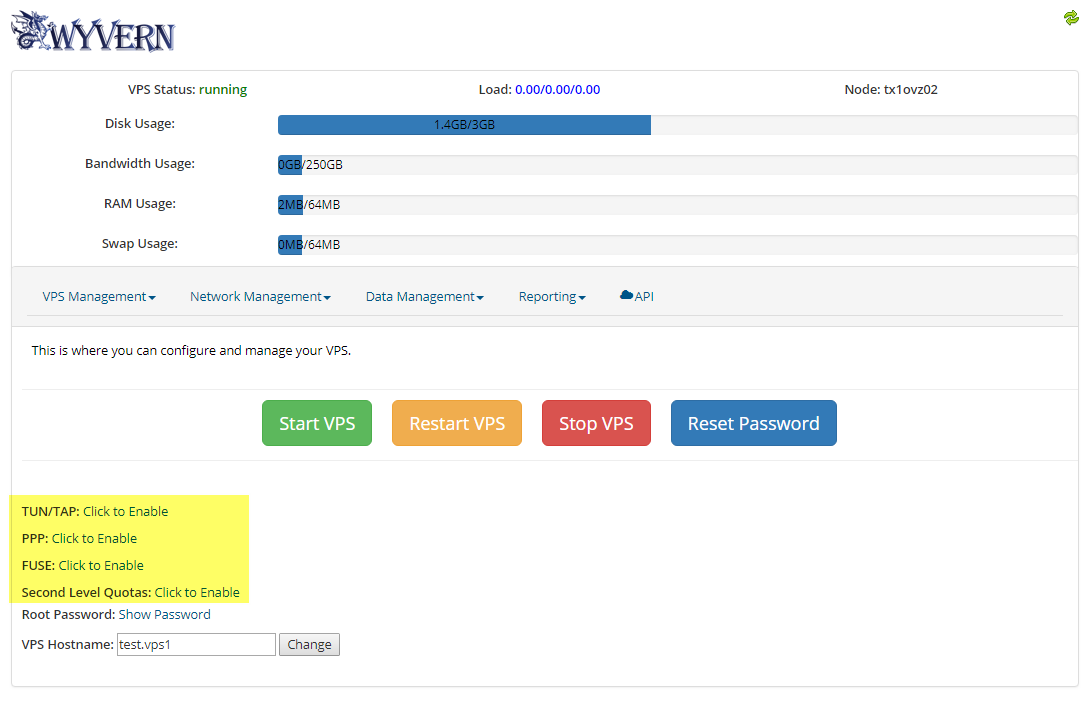
You can enable these very easily inside Wyvern by clicking on the "Click to Enable" link for your VPS.

Verifing Modules:
TUN/TAP - Run the following command, the output should be "File descriptor in bad state": cat /dev/net/tun

PPP - Run the following command, the output should be "No such device or address": cat /dev/ppp

FUSE - Run the following command, the output should be "Operation not permitted": cat /dev/fuse

  • 4 Users Found This Useful
Was this answer helpful?

Related Articles

HOW TO: Changing your OS for OpenVZ

Just go into Wyvern, select your new OS from the dropdown menu in the "Config" tab, and click the...

HOW TO: Reset your root password for your OpenVZ VPS

Just go into Wyvern and click the Reset Password button. Keep in mind that this password is saved...

Why is my bandwidth usage different than my bandwidth graph?

The bandwidth usage bar is calculated differently than the bandwidth graph. The bandwidth usage...

Where are my old IPv6 addresses I had in SolusVM?

The IPv6 addresses that were assigned in SolusVM are not manageable in Wyvern but they are still...

HOW TO: Managing your VPS with Wyvern

1) Login to the Client Area at https://securedragon.net/clients/2) Click on Services then click...