HOW TO: Migrate your VPS

RECOMMENDED: Make sure to take a complete backup of your data and save it to your computer or another server since all backups will be deleted before the migration! It's also a good idea to set a low TTL for your DNS records to limit the time it takes for DNS to updates, don't forget to set the TTL back after a day or 2 to reduce the number of DNS queries to your DNS servers.

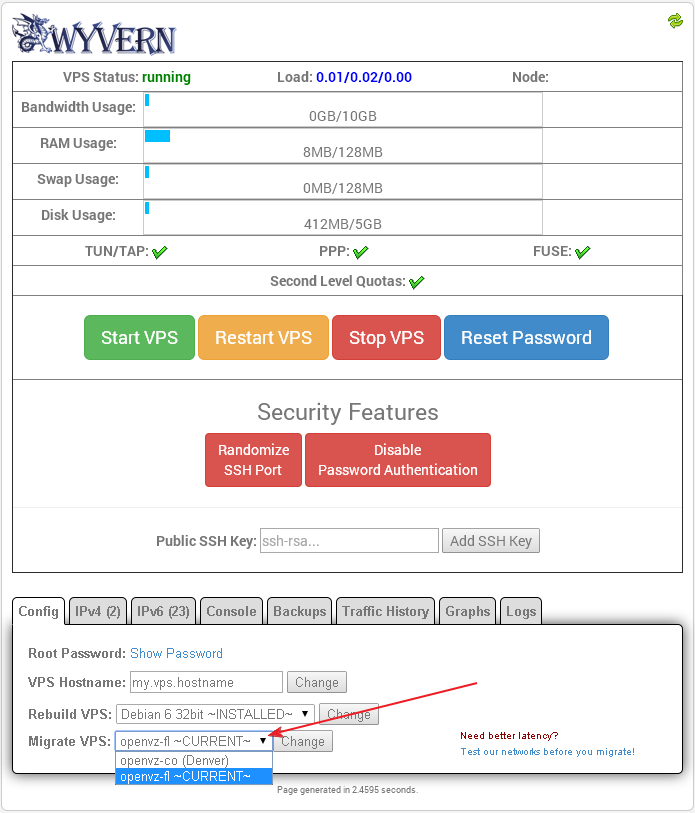
Just go into Wyvern, select the server you want to migrate it to in the "Config" tab, and click the 
Change button. A ticket will be opened when the migration is completed and the new IP will be in the IPv4 tab.


  • 0 משתמשים שמצאו מאמר זה מועיל
?האם התשובה שקיבלתם הייתה מועילה

מאמרים קשורים

HOW TO: Changing your OS for OpenVZ

Just go into Wyvern, select your new OS from the dropdown menu in the "Config" tab, and click the...

HOW TO: Enable TUN/TAP, PPP, FUSE and Second Level Quotas

You can enable these very easily inside Wyvern by clicking on the "Click to Enable" link for your...

HOW TO: Reset your root password for your OpenVZ VPS

Just go into Wyvern and click the Reset Password button. Keep in mind that this password is saved...

Why is my bandwidth usage different than my bandwidth graph?

The bandwidth usage bar is calculated differently than the bandwidth graph. The bandwidth usage...

Where are my old IPv6 addresses I had in SolusVM?

The IPv6 addresses that were assigned in SolusVM are not manageable in Wyvern but they are still...